Showing posts with label circles. Show all posts

Tuesday, January 12, 2016

Similar Triangles

So now I'm going to blog about something that I'm just starting to think about.

For two days, I've had a tab open with a neat Futility Closet post. (So many clever bits of mathematics and reasoning there.) It has this image:

A pleasing fact from David Wells’ Archimedes Mathematics Education Newsletter
I immediately made it up in GeoGebra, but being the start of a new semester, hadn't really thought about it yet. I didn't see what parallel lines had to do with it, nor being equilateral. About to close the tab finally, I shared it on Twitter. Boom!


Matt and John jumped in. And then HenrĂ­... 


I love the cycle of generalization in math! Get rid of this restriction, and that restriction.

Get rid of the 2nd line.
Get rid of the shared vertex.


And then the what ifs. What if we restricted a vertex in the preimage?

Surprise!

Lines and circles to lines and circles... must be complex. But John had already gotten there!
 

Then Simon found circles another way!


Now I'll go find someone to talk with locally about the complex transformations here. I could do it alone, but I prefer math in dialogue! I think I want to see someone else get excited the math, too.  I also enjoyed this coming up so soon after the post on Willingham's 4C's of story. Great illustration of the causality and complications inherent in an interesting mathematics situation.


It's available in GeoGebra if you want to play, too.

Tuesday, March 25, 2014

Archimedes' Twin Circles

So the Futility Closet, a constant source of neat results, puzzles, quotes and more, posted this pretty result:

As with many visual theorems, my first impulse was to make a dynamic visualization. Off to GeoGebra!

But I quickly hit a snag... I didn't know how to construct the tangent circles. I made the basic set up and then starting monkeying around. Eventually I thought about how to just make a circle tangent to one of the interior circles and the line.  I made a tracing point with the distance to the interior circle and the dividing line and traced along where it would be equidistant - a requirement for a circle tangent to both.

Of course - a parabola. To be tangent to a circle and a line is like the  definition of a parabola as all the points equidistant from the directrix and focus. The point D had to be on the parabola, which helped me to find the directrix. The focus had to be the center of the circle.


So then the other parabolas weren't too hard to find. The center of one of the twins had to be both on a parabola of tangents to an interior circle and the line, and a parabola for the enclosing circle and the line.


And now we can see that Archimedes result was true in general.


This is a special case of the Apollonian Circle problem (finding a circle tangent to three non-concentric circles &/or lines), and I feel like it was helpful in deepening my understanding of that. To be specific, a special case of the Circle-Circle-Line special case. But it was fun.

Now that we can construct them, how would you prove the twin-ness of these circles?

The sketch is, as usual, up on GeoGebraTube for you to play with yourself.

Postscript: the always educational Alexander Bogomolny (proprietor of Cut-the-Knot) had this to add on Google+:
They are no longer twins. E.g., Circle Triplets.

But there are more, Arbelos, and even more: C.W. Dodge, T. Schoch, P.Y. Woo, and P. Yiu, Those ubiquitous Archimedean circles, Mathematics Magazine, Vol. 72 (1999), 202-213. (JSTOR) and Some More Archimedean Circles in the Arbelos, Frank Power, Forum Geometricorum, 2005. (postscript).

Monday, February 4, 2013

Spirograph 2 - GeoGebra Animation

Okay, I've played with cycloids before. But when Guillermo recently updated his hypocycloid tutorial, it gave me the push to play again, since I'm always trying to get better at the GGB. Making it helped me understand GeoGebra animation a bit better, so I thought I'd share. I also think the resulting sketch could be the basis of a pretty nice open ended activity.


Obviously, having too much fun.

As good as Guillermo's instructions are, I'm the student who wants to figure it out for himself. One of my easiest teaching mistakes is to assume that my students are like me, and to provide too little support. Although I can overcompensate and then dictate too much, too. To provide student choice is the ticket.

So I started with the circle. I debated about making the controls be the radii for the boundary circle and the rolling circle, but finally decided to make it the boundary radius and a fraction of that for the rolling circle. Originally just a decimal, 0 to 1 incrementing by .05, but eventually I decided to make it a proper fraction, and on the slider control made the increment 1/60. It will show as a decimal approximation, but GGB stores it as the fraction for all practical purposes.

Then the rolling. The usual thing to do animation is to make a slider for time. My first take was to have the slider just go from 0 to 2\(\pi \). (Or 0 to 360 degrees, but I didn't want the units hassle.) Then I increased it to 10\(\pi \), but finally decided that it's neat to choose the number of rotations, so I made a 'circuits' slider for how many revolutions and defined the time slider to go to circuits*2\(\pi \). I use sliders instead of input boxes when possible because the input boxes don't work in HTML5/mobile devices yet.

Now the geometry. Really the rolling circle slides around the boundary at a contact point, rotated by the time slider away from some arbitrary starting point. The rolling you simulate by rotating the sliding contact point around the small circle. But how far does it rotate? My naive first take was that it should be as far as you've slid around the larger circle, thinking about it as a distance, like a string wrapping around. When you've gone angle \(\alpha\) around, you've gone distance \(\alpha\)*radius. Putting that in...
... pretty! But not a trochoid. It took me a few minutes to realize that I wanted the angle to rotate, not the distance. So if the circumference you've traveled is \(\alpha\)*big radius, then that's
$$
\frac{\alpha * \text{big radius}}{ \text{small circumference} }
= \frac{\alpha *a}{2\pi*\text {small radius}}
= \frac{\alpha *a}{2\pi*b*a}= \frac{\alpha}{2\pi*b}$$
So the angle is \(\frac{\alpha}{2\pi*b}*2\pi\) or just my time&angle variable divided by my radius ratio, t/b. I still have to think about what happened with the first try - obviously there's something mathy there.

It didn't look a lot like it was rolling, so I added the spokes to the small wheel by rotating a segment from the center to the rolling point around the small circle center.

Since I added the number of circuits as a variable, it made the speed of the sketch animation change and I couldn't find a value that was good for any number of circuits. But when I added a slider for the speed of the animation, I lost the play/pause button for the time. You can still control it with a right-click context menu, but that's not very user friendly.

So I started digging around the GeoGebra manual for animation controls, and finally found StartAnimation.  In particular, the boolean version,
StartAnimation[ point, slider, ... , boolean]
animates whatever is listed if the boolean is true, and stops it if false. Now I could make a boolean variable for animation (called 'animated' here), and control it with a button.

I'm using SetValue more than variable assignment lately because it avoids some weird issues that come from fixing a variable. ("!" is the text version of \(\not\) ) This also allows me to make the animation of t just a once through instead of repeating, which makes choosing the number of circuits more relevant. Here's the final version of the time slider:

To make the sketch more Spirography, I  took out some of the erasing and timer resetting from the scripts for sliders and buttons, and added in the color controls for the pen. The color values in GeoGebra are between 0 and 1, as opposed to 0 to 255 in some programming.


Activities/Problem ideas:
  • Given a ratio, how many circuits to completely draw the hypotrochoid? How many vertices will it have?
  • How are the hypotrochoids for ratios with common denominators similar and different? Why does that happen?
  • Make an image that is aesthetically appealing to you. Document your process. What did you have to figure out to make it? What math can you see in the final image?
  • What kind of mathematical curve is one side of a hypotrochoid? How do you know? Can you prove it? Why would it be that way?
  • Give students a challenge image, and ask them to duplicate it or investigate the mathematical properties. Or ask them to make a challenge image for another group then swap.
How else might you use a sketch like this?

Here's the sketch at GeoGebraTube or as an applet (works on mobiles).  Hope you have at least 11/60 as much fun as I did with this.

Post Script:
With that work done, it's been easy to add features. I added a mirror point on an outside circle so that the sketch could do epicycloids. Then I dilated the pen points from the center of the rolling circles to get full on trochoid glory. Here's the final sketch on GGBT and mobile app.

Have fun! Send me a cool image!

Tuesday, November 27, 2012

Pretty Petals


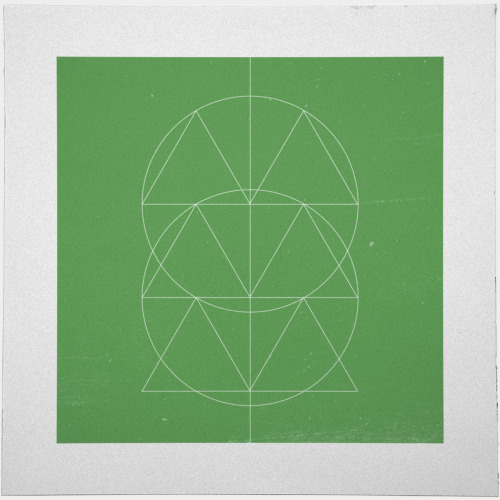
I was appreciating the geometrydaily:
#332 Totem – A new minimal geometric composition each day
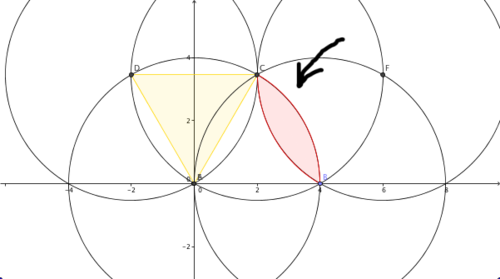
And got to noticing the always neat equliateral triangle proportions in the circle where the side length is the radius. So I have to fire up GeoGebra and start playing.


I got fascinated by the lenses formed by the circular arcs trapped by the triangles, and started wondering about tangential lenses in osculating congruent circles. (Petals, I was thinking. Pretty petals.) This is the special case when the cutting chord is a radius. So I made a sketch to play with lenses of different length.


Now I'm quite curious about those special lengths of the petals. Here's the sketch if you'd like to play with it:  teacher's page (download) and student's page (applet).

Other GeoGebra inspired by Geometry Daily:

Thursday, January 19, 2012

Out of Bread

Out of bread this morning so ... tortillas for the kids' sandwiches. (Making tight little appetizer style rolls.) The first piece of salami for my Ysabela's funroll (marketing considerations) instantly prompted my math curiosity.
Zero

Any questions?

But then I wondered about what photo would be best for #anyqs?

One
Two


Three


And then just because...

Mmmm, ellipses. Did you see that eccentricity comic recently? (Xavier won't eat salami.)

I think the original photo (Zero) is the best for getting at the question I like here - how many pieces of salami to cover the tortilla? One gets at diameter comparison, Two does that even more literally, and Three might help create some dissonance. Which would you use?

I neglected to take pictures of the fun rolls (TM) despite my recent interest in spirals. May have to make a jelly roll.

Monday, May 23, 2011

Spirograph 1

from Robert S Donovan @ Flickr
I have always loved Spirographs.  When I inherited my sister's I was in heaven - I think the exact box pictured here, supposedly from 1968.

Seeing this tumblr entry with an animated Spirograph picture when I had a few minutes sorta free, inspired me to finally put together a sketch.  So I thought I'd share it.  It's definitely good for experimenting to see if you can figure out what is going on.  Very fun to make.  The webpage lets you see the patterns, but doesn't give nearly the control that the GeoGebra file does.  It succeeded insofar as you can make some pretty pictures, and I didn't have to cheat by parameterizing the curves..

I'm interested in developing some lessons on ratios that could be visualized in interesting ways with the curves traced. If you have feedback on the sketch or on the lesson idea, I'd love to hear it.

The View menu should allow you to refresh views in the applet below, but it can get hung up.  I sometimes have to click pause several times before it pauses.  As I said, on this one I recommend the GeoGebra file, if you're going to do any serious playing around.


Sorry, the GeoGebra Applet could not be started. Please make sure that Java 1.4.2 (or later) is installed and active in your browser (Click here to install Java now)