Showing posts with label patterning. Show all posts

Wednesday, August 27, 2014

Clap Hands - a motion pattern game

This game must exist in some form elsewhere, but it came to me yesterday and we worked out a good version of it with my preservice teachers this morning.

It starts with getting to do some of Malke Rosenfeld's Math in Your Feet this summer at Twitter Math Camp, and then subsequent discussions with her that have me thinking a lot about embodied cognition. The example of this in Math in Your Feet was knowing what I needed to do but the challenge of getting my body to do. Move left foot, move! In discussions, she connects this powerfully to research and writing of Seymour Papert. She said something like:
embodied vs “non-embodied” from the research: there is no non-embodied math. Either we’re pulling from previous lived-in-the-world experience to learn, or we’re actively constructing our understanding of self moving in space. We can harness that to give students an understanding of the world.
She's deep that way.

On our first day of class, one of the things we did was watch Ken Robinson's Do Schools Kill Creativity?  (If you haven't watched it, give it a go. He's a powerful speaker on creativity, and as close to Ricky Gervais as we're going to get in academia.) The student response from my class was really focused on movement. The Gillian Lynne story especially seemed to resonate; good omens for some of the learning I hope to do this semester.

So today we're studying patterns. First activity was pulling out the pattern blocks. We used that to model how to introduce math manipulatives to elementary students, and introduce the principle that with a new manipulative you need free play. Either immediately or promise the students specifically when they will get it. (Good management meets good pedagogy.) We used free play to introduce the question: is this free play doing math? Which we discussed in Elizabeth's Talking Points structure. (Fabulous, even the first time out.) Then in whole group used our examples to discuss the difference between a design and a pattern. (Is there a difference to you? I'd love to know what you think about that.)

Then it was time to go outside...

Clap Hands

groups of 4 to 7 people

Arrange people in circles of about 6. The game is pretty simple:

Building
  • One player starts, introducing a motion. Like, for example, a simple clap. Going around the circle, each player does the motion.
  • After the starting player does the motion, the next player adds a motion. Clap hands, raise right hand. Each player does the 2 part sequence.
  • After the second player does their two, the next player adds a motion. Clap hands, raise right hand, turn around clockwise.
  • And so on, until each player has added a motion and it has gone around. Clap hands, raise right, spin right, jump, snap fingers, shake right foot twice.
Survivor
  • The goal is to get the pattern to go around twice more. When it does, that pattern is complete!
  • If a player messes up the sequence, they step out. Try to get twice around from there.
  • If you get down to two people, the pattern is done.

I didn't get video because I needed to play this! Thanks to Jordan and other students who had great suggestions. Reaction to the game was very positive, and people were quite engaged. There was much laughter, too. Keeper!

I'm interested in your feedback on the game, and how you present patterns. So if you have time to tweet or comment, let me know.

Thursday, May 1, 2014

Truchet

Last month, the always charming Math Munch had a post on Truchet squares. In their simplest form, rectangular arrays of squares with one right isosceles half colored in. I'd kept them in the back of my head to play with in GeoGebra, then yesterday had a freeish day and a conversation with a quilter friend that brought them back to mind.


The first part of this post is making the GeoGebra, the second is playing around with the new tool. (Here's the sketch on GeoGebraTube if you'd rather play than read.)

GeoGebra
The first goal was to make a random Truchet square. I knew I'd want to have size choices, so I put in a slider for that. I made a tool to make a right isosceles triangle from a center point and one corner of a square. I thought I could make an array of square center points, and then rotate corners around.  Nested sequences are good for arrays of points, like:
list1=Sequence[Sequence[A + (2i, -2 j), i, 0, n - 1], j, 0, n - 1]
But that will make you a list of lists of points. Sometimes what you want, but not here. Easy to fix, though, with:
 list4=Join[list1]

I thought I could make my random corners with a sequence command, like
Sequence[Element[list4,i]+(RandomElement[{-1,1}], RandomElement[{-1,1}]), i, 1, length[list4]]
But it turns out that will only call the RandomElement command once! Not so random looking if they all have the same value. The work around I found in the GeoGebra Forum. Make a list of random values directly, then use that list. So I made two lists of random 1 or -1, then
Sequence[Element[list4, i] + (Element[listx, i], Element[listy, i]), i, 1, Length[list4]]

The second option is just an array of triangles fixed to a square array of points. Part of the reason the grid is turned on is because that helps those snap to the corners. Unfotunately, I don't know a way to make those kind of things in a list; or rather, I can, but the resulting points aren't individually selectable. So I just made the array and circles around them by sequence, then the TruchetTri tool I had made to make the triangles.

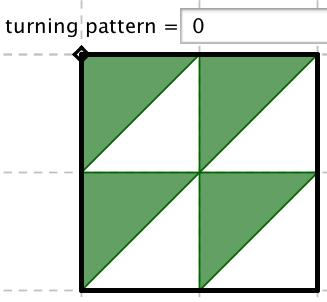
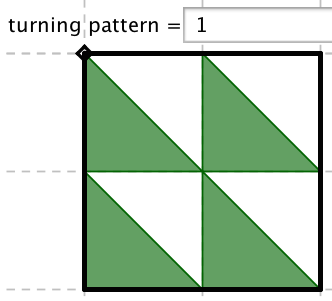
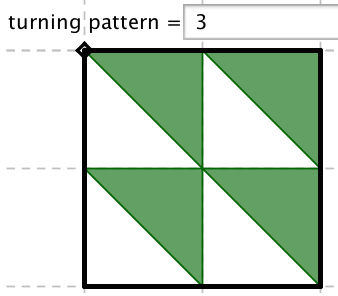
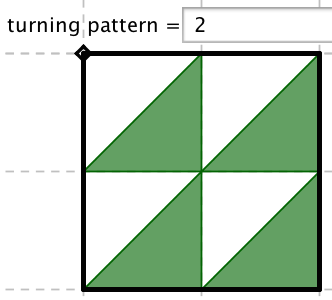
The third option was the real goal for me. I wanted to make a way to put in a rule, then have the Truchet pattern show the rule. Essentially, you want a sequence with values 0 to 3 to show which position the Truchet triangle is in.


So I thought of it as rotating the upper right corner around the center by a multiple of 90°. Then it would naturally be modular. So any function that sends integers to integers would work! That sounded fun to me. The final command was:
Sequence[Rotate[Element[list4, i] + (1, 1), (turn(i) 90)°, Element[list4, i]], i, 1, Length[list4]]
 where turn(x) is the function that you input.

Time to Play
So what can you make?

The random can be fun:
 
It's amazing the patterns your mind will make up and see. Lots of these shapes do show up in the patterned squares that you make.

The design your own can be interesting. I'd imagine students making many patterns or symmetrical designs on their own. Hopefully that would lead to some graph paper doodling.


But as I said, the rules were what I wanted to play with. Polynomials with integer coefficients are integer to integer maps. Here's turn(x)=x and turn(x)= \( x^3 \).


The different grid sizes pay off here, as you can get different effects depending on how often you wrap around. Here's turn(x)= \( x^4 +x \) in a 5x5 and 6x6.


Looking at a couple across all the grid sizes, here's the difference between \( x^4+x^2 \) and \( x^4+2x^2 \).

Of course, things can get funkier... here's round(sin(x))+x, 

And ceil(x)!. (Factorial, not excitement. What's going on at the end there?)


The last setting is so that you can combine a pattern and a random. I find these very aesthetically pleasing.


I hope you give it a try. I think there's some good mathematical explorations here as well as the mathart possibilities, so let me know what you find, notice or make!

Here's the sketch on GeoGebraTube.  If you want to use the Truchet tool yourself, you'll have to download the file rather than use the student view.